ओपन सोर्स · लोकल CLI

आपका CI टूट जाता है।
Stitch उसे ठीक करता है।

अपनी CI लोकल पर चलाएं। AI से फेल्योर ठीक करें। Stitch आपके मौजूदा CI कॉन्फ़िग को पढ़ता है, सेकंड में आपकी मशीन पर जॉब चलाता है, और फेल्योर को एक AI एजेंट को सौंप देता है जो उन्हें ठीक करता है। कोई API key नहीं, कोई कॉन्फ़िग फ़ाइल नहीं।

शुरू करें
01 —— how it works

A bird that weaves the loose threads of your pipeline.

Stitch runs your CI config — but on your machine, before you push. When it finds a failure, it hands the context to Claude and applies the patch. No broken PR opened.

Read .github/workflows/ci.yml
Run jobs locally (Docker)
Detect failures and collect context
Hand errors + stack to the agent
Apply the patch and re-test
Green. Ready to push.
~/acme-api · stitch-agent live
0
कॉन्फ़िग फ़ाइलें
2
AI एजेंट
~10s
फीडबैक समय
100%
आपकी CI का
02 —— principles

Local by design.
Transparent by principle.

We never ship your code anywhere you did not authorize yourself. The agent reads, runs, patches — all inside your machine.

तीन चरण। पूरी तरह से लोकल।

कॉन्फ़िग से हरे CI तक, Stitch पूरे लूप को आपकी मशीन पर टर्मिनल छोड़े बिना चलाता है।

पार्स करें

stitch run claude चलाएं। Stitch आपकी .gitlab-ci.yml या GitHub Actions workflows को पार्स करता है, jobs को वर्गीकृत करता है, और infrastructure jobs को स्वचालित रूप से छोड़ देता है।

निष्पादित करें

Jobs स्थानीय रूप से timeouts और isolation के साथ चलते हैं। परिणाम प्रगति ट्रैकिंग के साथ एक लाइव TUI में दिखाई देते हैं। सेकंड, मिनट नहीं।

ठीक करें

विफल jobs आपके AI agent (Claude Code या Codex) को सौंपे जाते हैं। Agent जांच करता है, फ़ाइलें संपादित करता है, और Stitch सत्यापन के लिए पुनः चलाता है। आप तक बढ़ाने से पहले 3 प्रयास तक।

I

Your repo. Your machine.

No intermediate server. Stitch runs in your shell, reads your file tree, and writes patches on top. Shut it down and nothing lingers.

II

Zero new API keys.

Uses the Claude Code credentials you already have. We do not ask for tokens, we do not store anything.

III

Everything is reversible.

Every patch lands in an isolated commit. git reset takes you back exactly where you were.

IV

No magic.

Whatever you would see in your cloud CI, you see in your terminal. Same jobs, same containers, same result — without the wait cycle.

03 —— फीचर्स

आपके CI पाइपलाइन को खुद ठीक होने के लिए सब कुछ

Stitch उन चीज़ों को पकड़ता है जो कोड रिव्यू से छूट जाती हैं — lint एरर, टाइप में बेमेल, टूटे हुए टेस्ट — और उन्हें आपके ध्यान में आने से पहले ठीक कर देता है।

ज़ीरो कॉन्फ़िग

आपका मौजूदा .gitlab-ci.yml या GitHub Actions कॉन्फ़िग इस्तेमाल करता है। न सेटअप, न दोबारा लिखना, न अतिरिक्त YAML।

लोकल-फ़र्स्ट

आपकी मशीन पर सेकंड में जॉब चलाता है। रिमोट CI रनर या पाइपलाइन कतारों का इंतज़ार नहीं।

प्लग-एबल AI एजेंट

Claude Code या OpenAI Codex लगाएं। अपनी मौजूदा सब्सक्रिप्शन का इस्तेमाल करें। कोई API key मैनेज नहीं करनी।

इंटरैक्टिव TUI

Stitch के काम करते हुए लाइव प्रगति, जॉब स्टेटस और ड्राइवर गतिविधि के साथ खूबसूरत टर्मिनल UI।

वॉच मोड

कोडिंग के दौरान लगातार वेलिडेशन। फ़ाइलें बदलने पर जॉब अपने आप दोबारा चलते हैं।

स्मार्ट जॉब फ़िल्टरिंग

deploy, publish और infra जॉब को अपने आप पहचानकर स्किप करता है। सिर्फ़ वही चलाता है जो लोकल में ज़रूरी है।

ऑटो कमिट और पुश

फिक्स पास होने पर Stitch अपने आप कमिट और पुश कर देता है। आप अपने फ्लो में बने रहते हैं।

मल्टी-प्लेटफ़ॉर्म

GitLab CI और GitHub Actions, self-hosted सहित। आपके मौजूदा कॉन्फ़िग को वैसे ही पढ़ता है।

04 —— असली आउटपुट। mockup नहीं।

यह है Stitch। असली मशीन पर चलता हुआ।

इस पेज पर बाकी सब Stitch क्या करता है उसके बारे में है। नीचे की रिकॉर्डिंग दिखाती हैं कि Stitch वह करते हुए कैसा दिखता है। असली टर्मिनल से लिया गया, बिना एडिट के।

लाइव रन

जब कोई job फेल होती है तो एजेंट कमान संभाल लेता है

एक कमांड। Stitch आपकी CI config पार्स करता है, verify jobs को लोकल पर चलाता है, failures को Claude Code या Codex को सौंपता है और फ़िक्स को फिर से verify करता है। सब कुछ एक ही टर्मिनल विंडो में बहता है।

  • Pipeline stepper ऊपर लाइव प्रगति संकेतक के साथ parse, execute, fix चरण।
  • Live job table हर job अपनी स्थिति, प्रयास संख्या और समय के साथ, चलते-चलते अपडेट होती है।
  • Driver panel आप देखते हैं कि एजेंट असल में क्या कर रहा है: कौन सी फ़ाइलें पढ़ी, कौन से कमांड चलाए, कौन से patch लगाए।
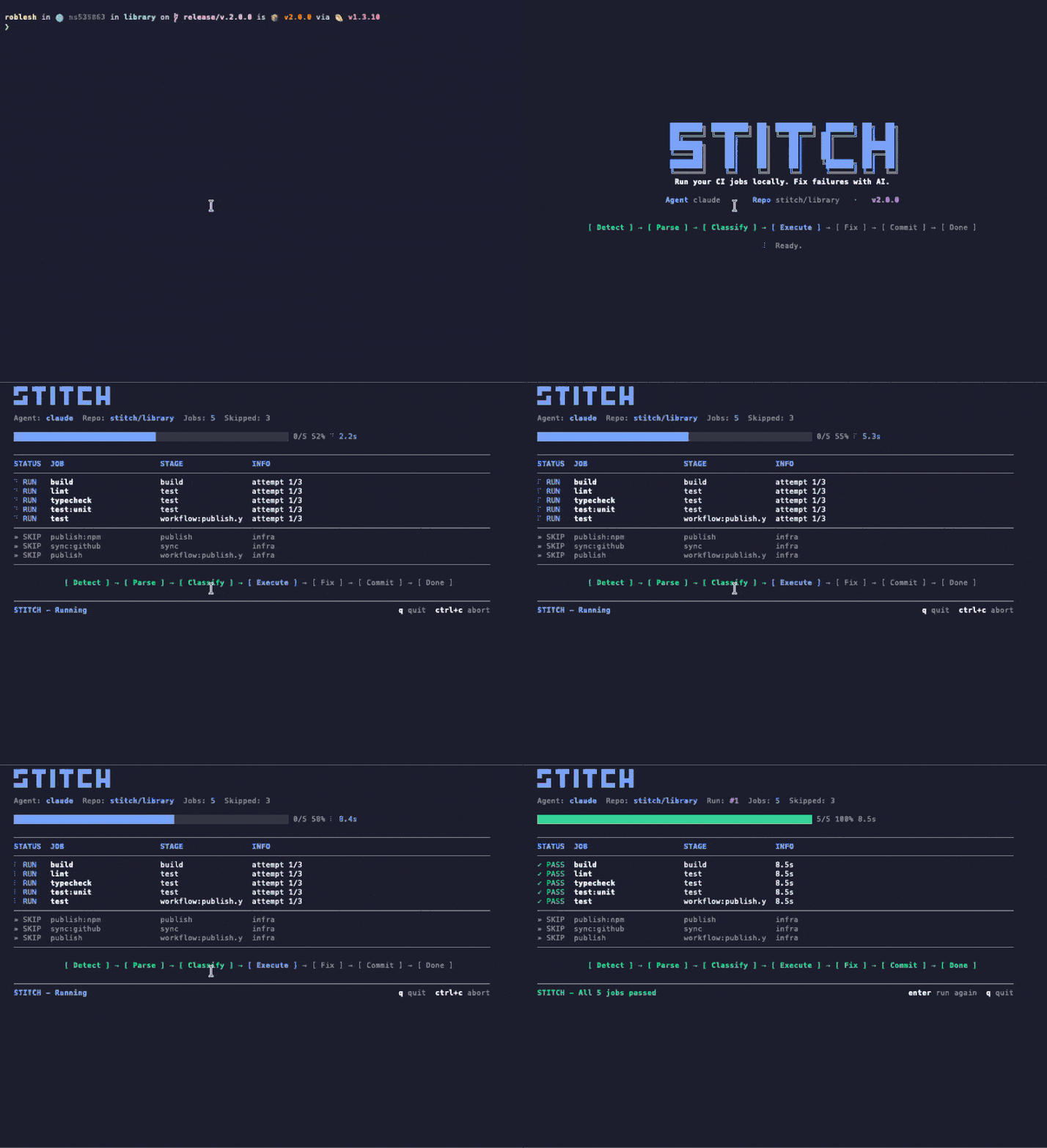
~/repo $ npx stitch-agent run claude
Animated terminal recording of stitch run claude showing the TUI with pipeline stepper, job table, and agent driver panel
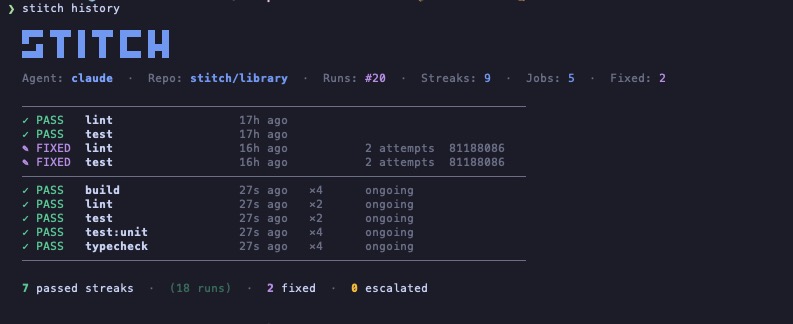
~/repo $ stitch history
Terminal screenshot of stitch history command showing STITCH ASCII logo, agent info, and a table of recent runs with pass, fixed, and ongoing states
रन इतिहास

हर रन रखी जाती है। streaks, fixes, escalations।

Stitch हर repo पर की गई हर रन दर्ज करता है। आप एक नज़र में देख सकते हैं कि कौन सी jobs खुद पास होती हैं, किन्हें एजेंट की ज़रूरत पड़ी और कौन सी escalate हुईं। कोई dashboard नहीं, कोई account नहीं। बस आपकी मशीन पर एक फ़ाइल।

  • Streaks PASS streaks उन verify jobs को दिखाती हैं जो बिना दखल के चलती रहती हैं।
  • Fixes FIXED एंट्रीज़ दर्ज करती हैं कि एजेंट ने एक failure कब सुलझाया, प्रयास संख्या और commit के साथ।
  • Escalations ऐसी failures जिन्हें एजेंट attempt की सीमा में नहीं सुलझा सका, उन्हें सामने लाया जाता है, छुपाया नहीं जाता।
05 —— Claude Code नेटिव

आपका एजेंट आपके कोड को वेरिफ़ाई करता है। कहने की ज़रूरत नहीं।

Stitch एक Claude Code skill के साथ आता है। एक बार इंस्टॉल करें और Claude Stitch को उन चार मौकों पर अपने आप चलाता है जहां टूटा कोड आमतौर पर निकल जाता है। कोई flag नहीं, कोई कमांड नहीं, कोई prompt नहीं।

अनुभव कैसा होता है

1
आप

Claude Code में "commit and push" टाइप करते हैं।

2
Claude

Stitch को लोकल पर सेकंडों में चलाता है, TUI लाइव इनलाइन स्ट्रीम होती है।

3
नतीजा

हरा, पुश हो जाता है। लाल, Claude पहले ठीक करता है, फिर पुश।

चार स्वचालित ट्रिगर

हर push से पहले

Claude से push, commit या PR खोलने को कहें। Stitch पहले चलता है। कुछ फेल हो तो commit आपकी मशीन पर ही रहता है।

किसी task के अंत में

फ़ीचर तैयार, bug ठीक, refactor पूरा। Claude काम खत्म घोषित करने से पहले आख़िरी कदम के रूप में Stitch चलाता है।

किसी todo को पूरा मार्क करने से पहले

अगर कोई TodoWrite आइटम ऐसे कोड को छूता है जिसे pipeline चेक करती, तो Claude टिक लगाने से पहले Stitch चलाता है।

context बदलते समय

जब आप किसी और बदलाव पर जाते हैं, Claude पिछले वाले को जांचता है ताकि कुछ टूटा पीछे न रह जाए।

skill को एक बार इंस्टॉल करें

एक symlink। Claude Code उसे अपने आप पहचानता है और "यह वेरिफ़ाई कर" या "pipeline ठीक कर" जैसी स्वाभाविक भाषा पर ट्रिगर हो जाता है। आप /stitch से उसे स्पष्ट रूप से भी बुला सकते हैं।

लोकल clone से
$ ln -s "$(pwd)/skills/stitch" ~/.claude/skills/stitch
ग्लोबल npm इंस्टॉल से
$ ln -s "$(npm root -g)/stitch-agent/skills/stitch" ~/.claude/skills/stitch
06 —— तुलना

Stitch कैसे टिकता है

ज़्यादातर CI असिस्टेंट चाहते हैं कि आप उनका cloud, उनका monorepo या उनका SDK अपनाएं। Stitch वही पढ़ता है जो आपके पास पहले से है और उसी मशीन पर चलता है जो आपके पास पहले से है।

क्षमता Stitch Gitar Nx Cloud Dagger + AI
आपके मौजूदा CI config का इस्तेमाल
jobs को लोकल पर चलाता है केवल cloud केवल cloud कंटेनर
बदलने लायक AI एजेंट कोई भी CLI एजेंट केवल built-in केवल built-in केवल built-in
नई infra की ज़रूरत कोई नहीं SaaS खाता Nx monorepo Dagger SDK
नेटिव Claude Code एकीकरण एक skill के साथ आता है
कीमत मुफ़्त $20/उपयोगकर्ता/माह से Nx Cloud योजना मुफ़्त (OSS)
07 —— उपयोग

एक कमांड। आपका मौजूदा कॉन्फ़िग।

Stitch आपकी मौजूदा CI कॉन्फ़िग पढ़ता है और वही जॉब लोकल पर चलाता है। कोई पाइपलाइन बदलाव नहीं, कोई अतिरिक्त सेवा नहीं, कोई नया YAML मेंटेन करने की ज़रूरत नहीं।

terminal
# Run every CI job locally
$ stitch run claude

# Only the jobs you care about
$ stitch run claude --jobs lint,test

# See what would run, without running it
$ stitch run claude --dry-run

# Re-run automatically on every file change
$ stitch run claude --watch --jobs lint,test
.gitlab-ci.yml
# Your existing CI config. Stitch reads it,
# no jobs to add, no changes to make.

lint:
  image: node:20
  script:
    - bun install
    - bun run lint

test:
  image: node:20
  script:
    - bun install
    - bun test

typecheck:
  image: node:20
  script:
    - bun install
    - bun run typecheck
08 —— सुरक्षा

असली गार्डरेल, सिर्फ वादे नहीं

Stitch आपके रेपो के अंदर समय, दायरे और जो आपकी मशीन से बाहर जा सकता है पर सख्त सीमाओं के साथ चलता है। आपकी पीठ पीछे कुछ नहीं होता।

निष्पादन टाइमआउट

हर job कॉन्फ़िगर करने योग्य timeout के साथ चलता है। भागते हुए commands को SIGKILL किया जाता है, कभी लटकने नहीं दिया जाता।

इन्फ्रास्ट्रक्चर ऑटो-स्किप

Deploy, publish, और release jobs को infra के रूप में वर्गीकृत और स्वचालित रूप से छोड़ा जाता है। केवल verify jobs स्थानीय रूप से चलते हैं।

Git क्लीन जाँच

Auto-commit और push केवल तब चलते हैं जब Stitch शुरू होने से पहले branch साफ़ था। आपका uncommitted काम अछूता है।

सीमित प्रयास

विफल jobs max_attempts (डिफ़ॉल्ट 3) तक पुनः प्रयास करते हैं। उसके बाद, Stitch tokens जलाने के बजाय आप तक बढ़ाता है।

स्थानीय रहता है

Jobs, logs, और fixes सभी आपकी मशीन पर चलते हैं। कोई cloud, telemetry, या webhooks नहीं जब तक आप कॉन्फ़िगर न करें।

.stitch.yml
languages: [typescript, python]
linter: eslint
test_runner: vitest
package_manager: pnpm
max_attempts: 3

conventions:
  - "Always use explicit return types on public functions."
  - "Never downgrade dependency versions."

auto_fix: [lint, format, simple_types, config_ci]
escalate: [logic_errors, breaking_changes, dependency_conflicts]

notify:
  channels:
    - type: slack
      webhook_url: https://hooks.slack.com/...
09 —— installation · 12 seconds

One command.
Zero config files.

node ≥20
v20.0+
claude code
installed
docker
optional
telemetry
never
10 —— questions

Questions we hear,
answered in plain words.

What does Stitch actually do?

Stitch reads your existing CI config (GitHub Actions or GitLab CI), runs the verify jobs locally on your machine, and hands any failure to your AI agent (Claude Code or Codex) to fix. When the fix passes locally, Stitch commits and pushes. No remote runner needed for the verify loop.

How is Stitch different from Nx Cloud, Gitar, or Dagger?

Nx Cloud, Gitar, and Dagger ask you to adopt their cloud, monorepo, or SDK. Stitch reads the CI config you already have and runs on the machine you already own. There is no SaaS account, no DSL, and the AI agent is whatever CLI you already use.

Does Stitch require API keys?

No. Stitch uses the Claude Code or Codex credentials you already have on your machine. There is nothing extra to manage and nothing extra to bill.

What CI providers are supported?

GitHub Actions and GitLab CI today, including self-hosted GitLab. Stitch parses the existing config and only runs verify-class jobs locally; deploy and publish jobs are skipped automatically.

Is Stitch free?

Yes. Stitch is open source under the MIT license, distributed on npm as stitch-agent. The only cost is whatever you already pay for your AI agent (Claude Code or Codex).

Does Stitch send my code anywhere?

No. Stitch runs locally. Your code stays on your machine. Your AI agent talks to its own API directly using your existing credentials, exactly the way it does when you run it manually. Stitch has no telemetry and no webhooks unless you configure them.

Can I use Stitch without Claude Code?

Yes. The agent layer is pluggable. Codex CLI works today; any CLI agent that takes a task description and returns code patches can be wired in. Claude Code is the default because we built the integration first, not because it is locked in.