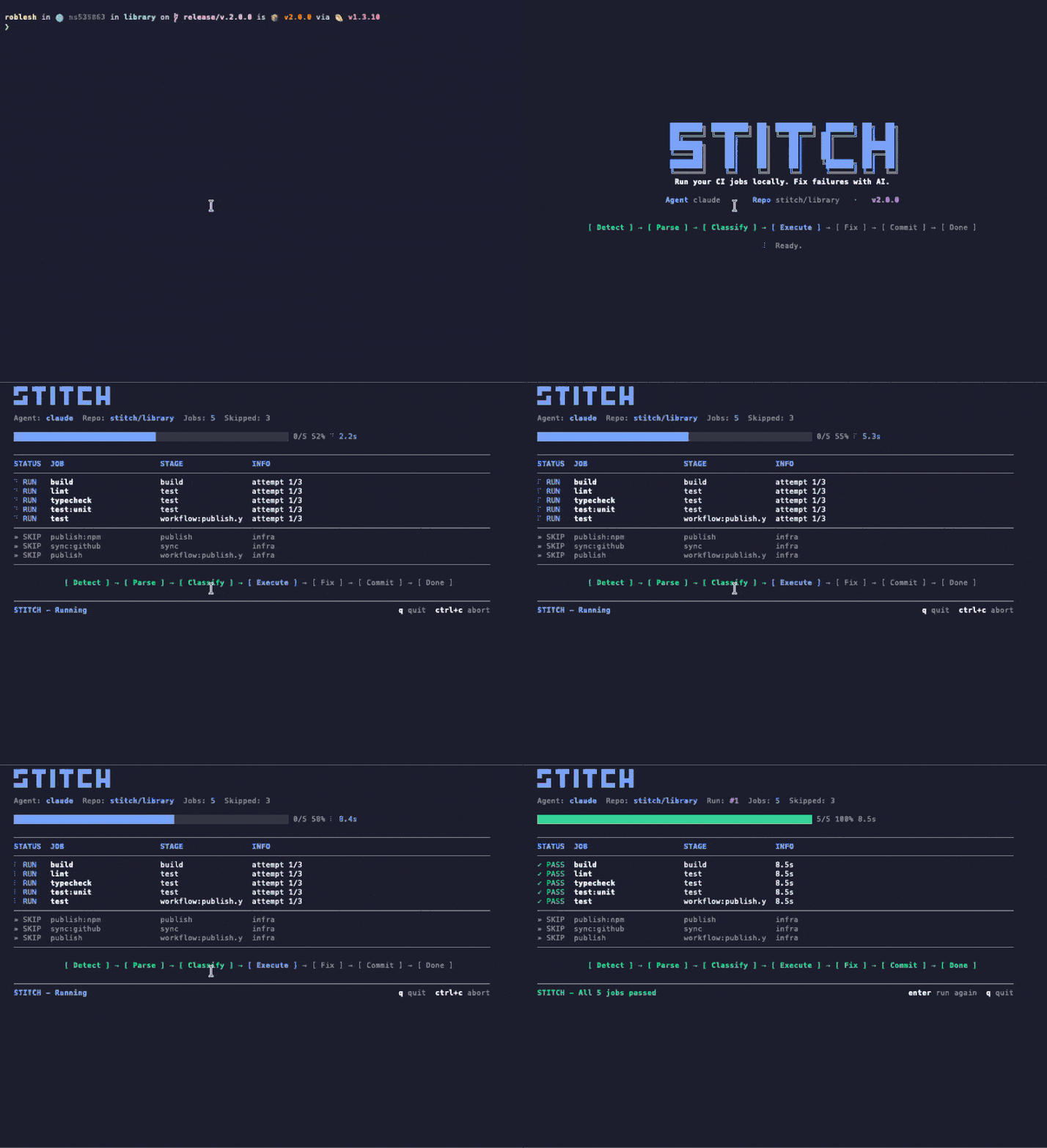
Esegui la tua CI in locale. Risolvi i fallimenti con l'IA. Stitch legge la tua configurazione CI esistente, esegue i job sulla tua macchina in pochi secondi e consegna i fallimenti a un agente IA che li risolve. Niente API key, niente file di configurazione.
Stitch runs your CI config — but on your machine, before you push. When it finds a failure, it hands the context to Claude and applies the patch. No broken PR opened.
Dalla config al CI verde, Stitch esegue tutto il ciclo sulla tua macchina senza lasciare il terminale.
Esegui stitch run claude. Stitch analizza il tuo .gitlab-ci.yml o i workflow di GitHub Actions, classifica i job e salta automaticamente quelli di infrastruttura.
I job girano localmente con timeout e isolamento. I risultati appaiono in una TUI live con tracciamento del progresso. Secondi, non minuti.
I job falliti vanno al tuo agente AI (Claude Code o Codex). L'agente indaga, modifica i file e Stitch riesegue per verificare. Fino a 3 tentativi prima di escalare a te.
No intermediate server. Stitch runs in your shell, reads your file tree, and writes patches on top. Shut it down and nothing lingers.
Uses the Claude Code credentials you already have. We do not ask for tokens, we do not store anything.
Every patch lands in an isolated commit. git reset takes you back exactly where you were.
Whatever you would see in your cloud CI, you see in your terminal. Same jobs, same containers, same result — without the wait cycle.
Stitch intercetta ciò che sfugge alla code review — errori di lint, incompatibilità di tipo, test falliti — e li corregge prima che tu te ne accorga.
Usa la tua .gitlab-ci.yml o GitHub Actions esistente. Niente setup, niente riscritture, niente YAML in più.
Esegue i job sulla tua macchina in pochi secondi. Niente attese di runner remoti o code di pipeline.
Collega Claude Code o OpenAI Codex. Usa il tuo abbonamento esistente. Zero API key da gestire.
Bella UI da terminale con progressi live, stato dei job e attività del driver mentre Stitch lavora.
Validazione continua mentre scrivi codice. I job si rieseguono in automatico quando cambiano i file.
Classifica e salta i job di deploy, publish e infrastruttura. In locale esegue solo ciò che conta.
Quando i fix passano, Stitch committa e pusha da solo. Tu resti nel flow.
GitLab CI e GitHub Actions, self-hosted inclusi. Legge la tua configurazione esistente così com'è.
Tutto il resto in questa pagina è ciò che fa Stitch. Le registrazioni qui sotto sono come appare Stitch mentre lo fa. Catturate da un terminale vero, senza editing.
Un comando. Stitch analizza la tua config di CI, esegue i job di verifica in locale, passa i fallimenti a Claude Code o Codex e riverifica il fix. Tutto scorre in un'unica finestra di terminale.
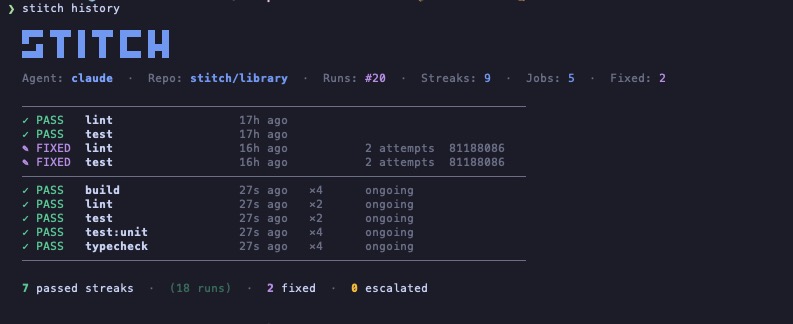
Stitch registra ogni esecuzione su un repo. Vedi al volo quali job passano da soli, quali hanno avuto bisogno dell'agente e quali sono stati escalati. Niente dashboard, niente account. Solo un file sulla tua macchina.
Stitch viene fornito con una skill Claude Code. Installala una volta e Claude esegue Stitch automaticamente nei quattro momenti in cui il codice rotto di solito sfugge. Niente flag, niente comando, niente prompt.
Scrivi "commit and push" in Claude Code.
Esegue Stitch in locale in pochi secondi, con la TUI in diretta.
Verde, il push va a buon fine. Rosso, Claude lo sistema prima e poi pusha.
Chiedi a Claude di pushare, committare o aprire una PR. Stitch parte per primo. Se qualcosa fallisce, il commit resta sulla tua macchina.
Feature finita, bug risolto, refactor consegnato. Claude esegue Stitch come ultimo passo prima di dichiarare il lavoro concluso.
Se un elemento TodoWrite tocca codice che una pipeline controllerebbe, Claude esegue Stitch prima di mettere la spunta.
Quando passi a un cambiamento diverso, Claude verifica il precedente così non resta nulla di rotto dietro.
Un symlink. Claude Code la rileva da solo e si attiva su menzioni in linguaggio naturale come "valida questo" o "sistema la pipeline". Puoi comunque chiamarla esplicitamente con /stitch.
$ ln -s "$(pwd)/skills/stitch" ~/.claude/skills/stitch
$ ln -s "$(npm root -g)/stitch-agent/skills/stitch" ~/.claude/skills/stitch
La maggior parte degli assistenti CI vuole che tu adotti il loro cloud, il loro monorepo o il loro SDK. Stitch legge quello che hai già e gira sulla macchina che hai già.
| Capacità | Stitch | Gitar | Nx Cloud | Dagger + AI |
|---|---|---|---|---|
| Usa la tua config CI esistente | ✓ | ✕ | ✕ | ✕ |
| Esegue i job in locale | ✓ | Solo cloud | Solo cloud | Container |
| Agente AI intercambiabile | Qualsiasi agente CLI | Solo integrato | Solo integrato | Solo integrato |
| Richiede nuova infrastruttura | Nessuna | Account SaaS | Monorepo Nx | Dagger SDK |
| Integrazione nativa con Claude Code | Fornito con una skill | ✕ | ✕ | ✕ |
| Prezzo | Gratuito | Da $20/utente/mese | Piano Nx Cloud | Gratuito (OSS) |
Stitch legge la configurazione CI che hai già ed esegue gli stessi job localmente. Nessuna modifica alla pipeline, nessun servizio extra, nessun nuovo YAML da mantenere.
# Run every CI job locally $ stitch run claude # Only the jobs you care about $ stitch run claude --jobs lint,test # See what would run, without running it $ stitch run claude --dry-run # Re-run automatically on every file change $ stitch run claude --watch --jobs lint,test
# Your existing CI config. Stitch reads it, # no jobs to add, no changes to make. lint: image: node:20 script: - bun install - bun run lint test: image: node:20 script: - bun install - bun test typecheck: image: node:20 script: - bun install - bun run typecheck
Stitch gira dentro il tuo repo con limiti rigidi su tempo, scope e cosa può uscire dalla tua macchina. Niente succede alle tue spalle.
Ogni job gira con un timeout configurabile. I comandi fuori controllo vengono terminati con SIGKILL, mai lasciati appesi.
I job di deploy, publish e release sono classificati come infra e saltati automaticamente. Solo i job di verifica girano localmente.
Auto-commit e push si attivano solo se il branch era pulito prima che Stitch partisse. Il tuo lavoro non committato è intoccabile.
I job falliti riprovano fino a max_attempts (default 3). Dopo, Stitch escala a te invece di bruciare token.
Job, log e fix girano tutti sulla tua macchina. Niente cloud, niente telemetria, niente webhook a meno che tu non li configuri.
languages: [typescript, python] linter: eslint test_runner: vitest package_manager: pnpm max_attempts: 3 conventions: - "Always use explicit return types on public functions." - "Never downgrade dependency versions." auto_fix: [lint, format, simple_types, config_ci] escalate: [logic_errors, breaking_changes, dependency_conflicts] notify: channels: - type: slack webhook_url: https://hooks.slack.com/...
Stitch reads your existing CI config (GitHub Actions or GitLab CI), runs the verify jobs locally on your machine, and hands any failure to your AI agent (Claude Code or Codex) to fix. When the fix passes locally, Stitch commits and pushes. No remote runner needed for the verify loop.
Nx Cloud, Gitar, and Dagger ask you to adopt their cloud, monorepo, or SDK. Stitch reads the CI config you already have and runs on the machine you already own. There is no SaaS account, no DSL, and the AI agent is whatever CLI you already use.
No. Stitch uses the Claude Code or Codex credentials you already have on your machine. There is nothing extra to manage and nothing extra to bill.
GitHub Actions and GitLab CI today, including self-hosted GitLab. Stitch parses the existing config and only runs verify-class jobs locally; deploy and publish jobs are skipped automatically.
Yes. Stitch is open source under the MIT license, distributed on npm as stitch-agent. The only cost is whatever you already pay for your AI agent (Claude Code or Codex).
No. Stitch runs locally. Your code stays on your machine. Your AI agent talks to its own API directly using your existing credentials, exactly the way it does when you run it manually. Stitch has no telemetry and no webhooks unless you configure them.
Yes. The agent layer is pluggable. Codex CLI works today; any CLI agent that takes a task description and returns code patches can be wired in. Claude Code is the default because we built the integration first, not because it is locked in.