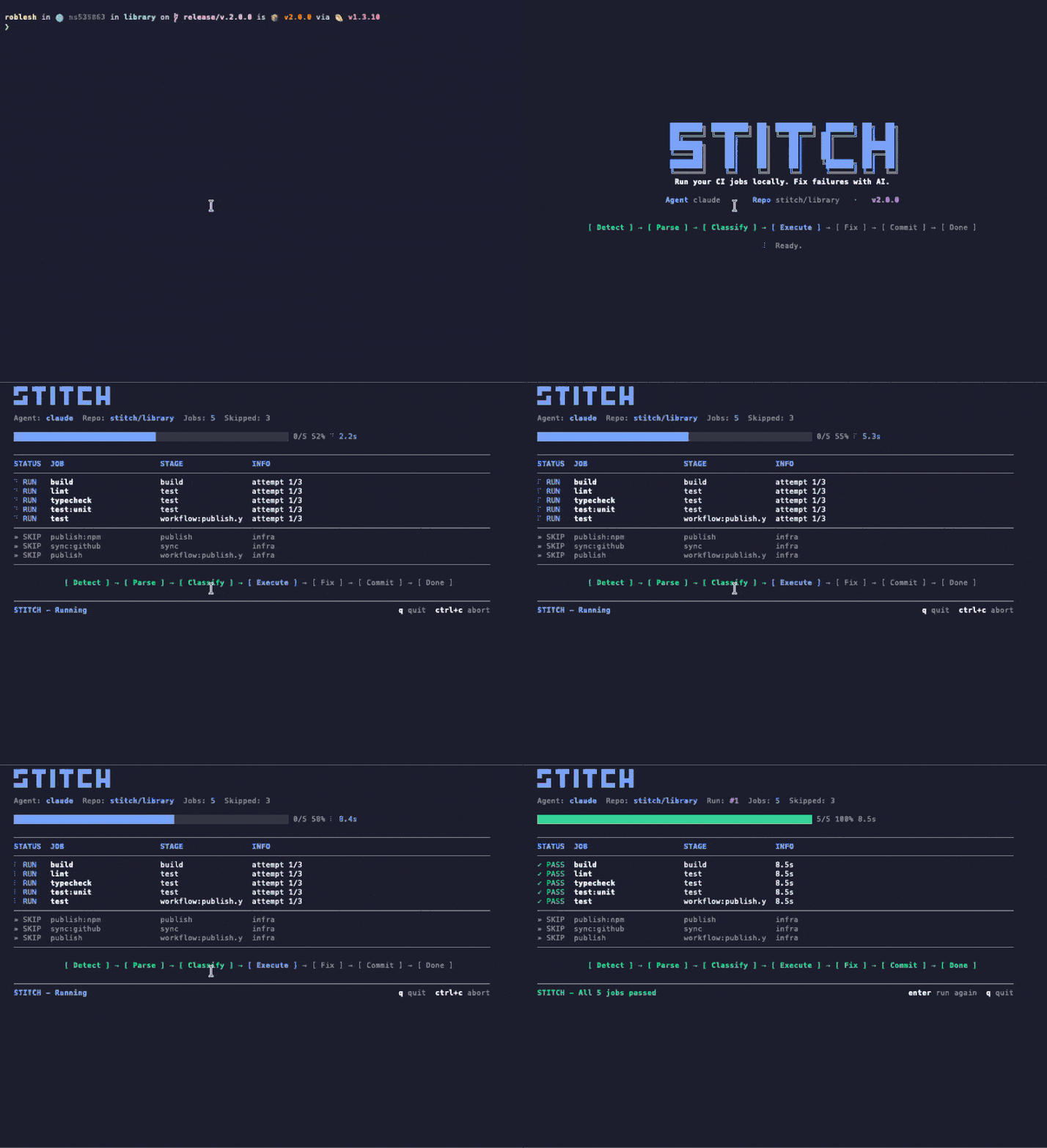
Draai je CI lokaal. Los fouten op met AI. Stitch leest je bestaande CI-config, draait jobs binnen seconden op je machine en geeft fouten door aan een AI-agent die ze oplost. Geen API-sleutels, geen configuratiebestanden.
Stitch runs your CI config — but on your machine, before you push. When it finds a failure, it hands the context to Claude and applies the patch. No broken PR opened.
Van config tot groene CI voert Stitch de hele lus uit op jouw machine zonder de terminal te verlaten.
Voer stitch run claude uit. Stitch parset je .gitlab-ci.yml of GitHub Actions workflows, classificeert jobs, en slaat infrastructuur-jobs automatisch over.
Jobs draaien lokaal met timeouts en isolatie. Resultaten verschijnen in een live TUI met voortgangstracking. Seconden, geen minuten.
Gefaalde jobs gaan naar je AI-agent (Claude Code of Codex). De agent onderzoekt, bewerkt bestanden, en Stitch voert opnieuw uit ter verificatie. Tot 3 pogingen voor escalatie naar jou.
No intermediate server. Stitch runs in your shell, reads your file tree, and writes patches on top. Shut it down and nothing lingers.
Uses the Claude Code credentials you already have. We do not ask for tokens, we do not store anything.
Every patch lands in an isolated commit. git reset takes you back exactly where you were.
Whatever you would see in your cloud CI, you see in your terminal. Same jobs, same containers, same result — without the wait cycle.
Stitch vangt wat door codereview glipt — lintfouten, typemismatches, kapotte tests — en herstelt ze voordat je het doorhebt.
Gebruikt je bestaande .gitlab-ci.yml of GitHub Actions. Geen setup, geen rewrite, geen extra YAML.
Draait jobs binnen seconden op je machine. Geen wachten op remote runners of pipelinequeues.
Gebruik Claude Code of OpenAI Codex. Via je bestaande abonnement. Geen API-sleutels om te beheren.
Mooie terminal-UI met live voortgang, jobstatus en driveractiviteit terwijl Stitch werkt.
Continue validatie terwijl je codeert. Draait jobs automatisch opnieuw als bestanden wijzigen.
Classificeert en slaat deploy-, publish- en infra-jobs over. Draait alleen wat er lokaal toe doet.
Als fixes slagen, committet en pusht Stitch automatisch. Jij blijft in flow.
GitLab CI en GitHub Actions, inclusief self-hosted. Leest je bestaande config zoals die is.
Al het andere op deze pagina is wat Stitch doet. De opnames hieronder laten zien hoe Stitch eruitziet terwijl het dat doet. Opgenomen uit een echte terminal, ongemonteerd.
Eén commando. Stitch leest je CI-config, draait verify-jobs lokaal, geeft fouten door aan Claude Code of Codex en herverifieert de fix. Alles loopt in één terminalvenster.
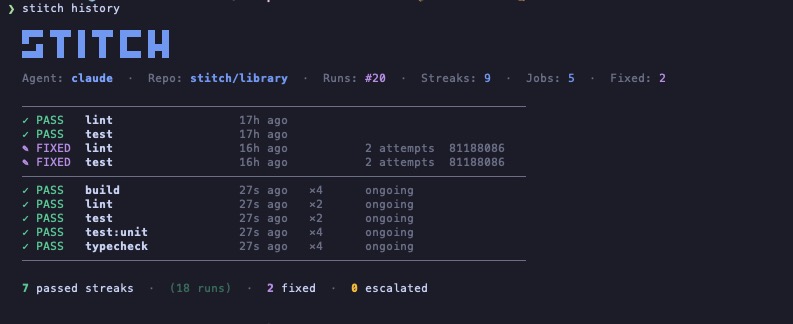
Stitch registreert elke run op een repo. Je ziet in één oogopslag welke jobs vanzelf slagen, welke de agent nodig hadden en welke geëscaleerd zijn. Geen dashboard, geen account. Gewoon een bestand op je machine.
Stitch komt met een Claude Code skill. Eenmaal geïnstalleerd draait Claude Stitch automatisch op de vier momenten waarop kapotte code doorgaans doorglipt. Geen flag, geen commando, geen prompt.
Typ "commit and push" in Claude Code.
Draait Stitch lokaal binnen seconden, met de TUI live inline.
Groen, de push gaat door. Rood, Claude fixt het eerst en pusht dan pas.
Vraag Claude om te pushen, committen of een PR te openen. Stitch draait eerst. Gaat er iets mis, dan blijft de commit op je machine.
Feature klaar, bug opgelost, refactor rond. Claude draait Stitch als laatste stap voor het werk af wordt verklaard.
Als een TodoWrite-item code raakt die een pipeline zou controleren, draait Claude Stitch voor hij het vinkje zet.
Stap je over naar een andere wijziging, dan checkt Claude de vorige zodat er niks kapots achterblijft.
Eén symlink. Claude Code pikt hem automatisch op en triggert op natuurlijke taal als "valideer dit" of "fix de pipeline". Je kunt hem ook expliciet aanroepen met /stitch.
$ ln -s "$(pwd)/skills/stitch" ~/.claude/skills/stitch
$ ln -s "$(npm root -g)/stitch-agent/skills/stitch" ~/.claude/skills/stitch
De meeste CI-assistenten willen dat je hun cloud, hun monorepo of hun SDK overneemt. Stitch leest wat je al hebt en draait op de machine die je al hebt.
| Mogelijkheid | Stitch | Gitar | Nx Cloud | Dagger + AI |
|---|---|---|---|---|
| Gebruikt je bestaande CI-config | ✓ | ✕ | ✕ | ✕ |
| Draait jobs lokaal | ✓ | Alleen cloud | Alleen cloud | Containers |
| Uitwisselbare AI-agent | Elke CLI-agent | Alleen ingebouwd | Alleen ingebouwd | Alleen ingebouwd |
| Vereist nieuwe infrastructuur | Geen | SaaS-account | Nx-monorepo | Dagger SDK |
| Native Claude Code integratie | Komt met een skill | ✕ | ✕ | ✕ |
| Prijs | Gratis | Vanaf $20/gebruiker/maand | Nx Cloud plan | Gratis (OSS) |
Stitch leest de CI-config die je al hebt en draait dezelfde jobs lokaal. Geen pipelinewijzigingen, geen extra diensten, geen nieuwe YAML om te onderhouden.
# Run every CI job locally $ stitch run claude # Only the jobs you care about $ stitch run claude --jobs lint,test # See what would run, without running it $ stitch run claude --dry-run # Re-run automatically on every file change $ stitch run claude --watch --jobs lint,test
# Your existing CI config. Stitch reads it, # no jobs to add, no changes to make. lint: image: node:20 script: - bun install - bun run lint test: image: node:20 script: - bun install - bun test typecheck: image: node:20 script: - bun install - bun run typecheck
Stitch draait binnen je repo met harde grenzen aan tijd, scope en wat je machine kan verlaten. Er gebeurt niets achter je rug om.
Elke job draait met een configureerbare timeout. Op hol geslagen commands worden met SIGKILL beëindigd, nooit laten hangen.
Deploy-, publish- en release-jobs worden als infra geclassificeerd en automatisch overgeslagen. Alleen verify-jobs draaien lokaal.
Auto-commit en push worden alleen getriggerd als de branch schoon was voordat Stitch startte. Je ongecommite werk is onaantastbaar.
Gefaalde jobs proberen opnieuw tot max_attempts (standaard 3). Daarna escaleert Stitch naar jou in plaats van tokens te verbranden.
Jobs, logs en fixes draaien allemaal op jouw machine. Geen cloud, geen telemetrie, geen webhooks tenzij je ze configureert.
languages: [typescript, python] linter: eslint test_runner: vitest package_manager: pnpm max_attempts: 3 conventions: - "Always use explicit return types on public functions." - "Never downgrade dependency versions." auto_fix: [lint, format, simple_types, config_ci] escalate: [logic_errors, breaking_changes, dependency_conflicts] notify: channels: - type: slack webhook_url: https://hooks.slack.com/...
Stitch reads your existing CI config (GitHub Actions or GitLab CI), runs the verify jobs locally on your machine, and hands any failure to your AI agent (Claude Code or Codex) to fix. When the fix passes locally, Stitch commits and pushes. No remote runner needed for the verify loop.
Nx Cloud, Gitar, and Dagger ask you to adopt their cloud, monorepo, or SDK. Stitch reads the CI config you already have and runs on the machine you already own. There is no SaaS account, no DSL, and the AI agent is whatever CLI you already use.
No. Stitch uses the Claude Code or Codex credentials you already have on your machine. There is nothing extra to manage and nothing extra to bill.
GitHub Actions and GitLab CI today, including self-hosted GitLab. Stitch parses the existing config and only runs verify-class jobs locally; deploy and publish jobs are skipped automatically.
Yes. Stitch is open source under the MIT license, distributed on npm as stitch-agent. The only cost is whatever you already pay for your AI agent (Claude Code or Codex).
No. Stitch runs locally. Your code stays on your machine. Your AI agent talks to its own API directly using your existing credentials, exactly the way it does when you run it manually. Stitch has no telemetry and no webhooks unless you configure them.
Yes. The agent layer is pluggable. Codex CLI works today; any CLI agent that takes a task description and returns code patches can be wired in. Claude Code is the default because we built the integration first, not because it is locked in.